
images.Filter
Syntax
Returns
Use this method with global resources, page resources, or remote resources.
The images.Filter function returns a new resource from a processable image after applying one or more image filters.
Use the reflect.IsImageResourceProcessable function to verify that an image can be processed.
Usage
Use the images.Filter function to apply effects such as blurring, sharpening, or grayscale conversion. You can pass a single filter or a slice of filters. When providing a slice, Hugo applies the filters from left to right.
To apply a single filter:
{{ with resources.Get "images/original.jpg" }}
  {{ with images.Filter images.Grayscale . }}
    <img src="{{ .RelPermalink }}" width="{{ .Width }}" height="{{ .Height }}" alt="">
  {{ end }}
{{ end }}
To apply two or more filters, executing from left to right:
{{ $filters := slice
  images.Grayscale
  (images.GaussianBlur 8)
}}
{{ with resources.Get "images/original.jpg" }}
  {{ with images.Filter $filters . }}
    <img src="{{ .RelPermalink }}" width="{{ .Width }}" height="{{ .Height }}" alt="">
  {{ end }}
{{ end }}
You can also apply image filters using the Filter method on a Resource object.
Example
{{ with resources.Get "images/original.jpg" }}
  {{ with images.Filter images.Grayscale . }}
    <img src="{{ .RelPermalink }}" width="{{ .Width }}" height="{{ .Height }}" alt="">
  {{ end }}
{{ end }}
Original
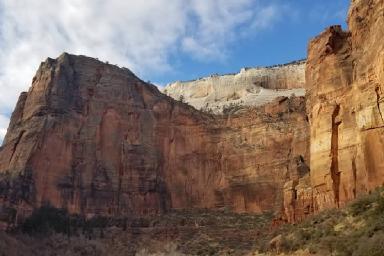
Processed
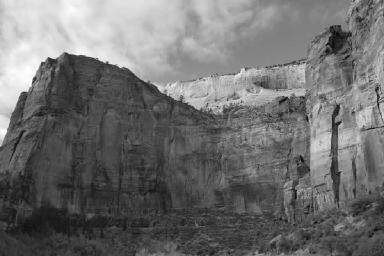
Image filters
Use any of these filters with the images.Filter function, or with the Filter method on a Resource object.
- images.AutoOrient
- Returns an image filter that rotates and flips an image as needed per its Exif orientation tag.
- images.Brightness
- Returns an image filter that changes the brightness of an image.
- images.ColorBalance
- Returns an image filter that changes the color balance of an image.
- images.Colorize
- Returns an image filter that produces a colorized version of an image.
- images.Contrast
- Returns an image filter that changes the contrast of an image.
- images.Dither
- Returns an image filter that dithers an image.
- images.Gamma
- Returns an image filter that performs gamma correction on an image.
- images.GaussianBlur
- Returns an image filter that applies a gaussian blur to an image.
- images.Grayscale
- Returns an image filter that produces a grayscale version of an image.
- images.Hue
- Returns an image filter that rotates the hue of an image.
- images.Invert
- Returns an image filter that negates the colors of an image.
- images.Mask
- Returns an image filter that applies a mask to the source image.
- images.Opacity
- Returns an image filter that changes the opacity of an image.
- images.Overlay
- Returns an image filter that overlays the source image at the given coordinates, relative to the upper left corner.
- images.Padding
- Returns an image filter that resizes the image canvas without resizing the image.
- images.Pixelate
- Returns an image filter that applies a pixelation effect to an image.
- images.Process
- Returns an image filter that processes an image according to the given processing specification.
- images.QR
- Encodes the given text into a QR code using the specified options, returning an image resource.
- images.Saturation
- Returns an image filter that changes the saturation of an image.
- images.Sepia
- Returns an image filter that produces a sepia-toned version of an image.
- images.Sigmoid
- Returns an image filter that changes the contrast of an image using a sigmoidal function.
- images.Text
- Returns an image filter that adds text to an image.
- images.UnsharpMask
- Returns an image filter that sharpens an image.